


|
Guide: How to find the Spare Parts Catalog 1. Locate Art. N. on the Alpina Plate (adhesive), usually located away from moving parts (near the handle or on the side of the machinery) 2. Enter your Art. N. (for example: 228216000/10 ) in the search field, then click Search. 3. There may be multiple variants: click on the section corresponding to the year of construction shown on the plate (for example: 2020) 4. If Art. N. is not shown on the nameplate, search by Model or Type How to read the Alpina Plate 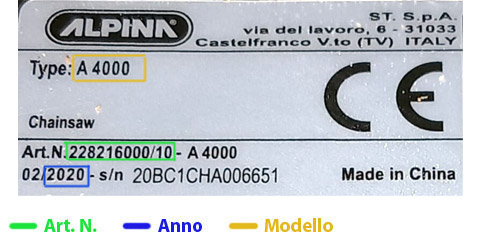 Haven't found your Model?No problem! Send us a photograph of the Alpina plate via Whatsapp or Email and our technical department will provide you with the breakdown in PDF format.
|
|---|
15699-alp
Chat with us
Select the department according to your need
Technical / Commercial
For information on the Purchase of Parts, Machineries and other Aricles
Write Text, Send Photos and Audio+39 324 664 3018
or by email
ordini@ceruticenter.it*For questions about purchasing Replacement Parts and requesting a photograph of the machine's Model Plate.
Order Support
For information about a pending order, log in to your account and click on:
- - Click "Details" to view your order
- - View the readiness status of each item
- - Add a message and click "Send." We'll get back to you within 24–48 hours.
or email us at: ordini@ceruticenter.it Please include your order number.